Integration: your feed, ready for the Community.
All we need is the address of your product feed. We read it every day, check it, enrich it with AI and turn it into the catalog the Community creates outfits from. Here's what happens, step by step.
- Intake12,480 products received
- Validation12,312 valid · 168 to fix
- Normalization38 categories mapped · 4,160 items
- AI enrichmentup to 24 attributes per item
- In the Community11,906 items ready for outfits
Five steps, every day, automatically.
From the file you publish to the item the Community pairs: every import goes through five checks. If something is wrong we alert you, and meanwhile the last correct version stays online.
- 01
Intake
We download the feed from the address you give us, via HTTPS or SFTP, or we receive it via API. Files up to 2 GB, even compressed.
XMLCSV · TSVJSON.gz · .zip - 02
Validation
We check required fields, links, images and prices. Products with errors are set aside and flagged in the report.
14 checksemail reports - 03
Normalization
We standardize categories, colors and sizes on the Bantoa taxonomy and group variants of the same item.
item_group_id1,200+ categories - 04
AI enrichment
Computer vision reads the photos and adds the style attributes your feed lacks: material, pattern, fit, occasion.
up to 24 attributes - 05
In the Community
Items enter the Social App catalog, ready for the outfit editor, editorial campaigns and your Brand Profile.
within 2 hours of import
Use the feed you already have. No dedicated development.
If you sell on Google Shopping or with Meta catalogs, your feed is already ready: we read it as is. Otherwise a CSV file or a connection to your e-commerce platform is enough.
 Google Merchant CenterXML · TSV · Google specs
 Meta CatalogCSV · XML · scheduled feed
 ShopifyBantoa app or public feed
 WooCommercefeed plugin · XML export
 Adobe Commerce (Magento)XML catalog export
 Salesforce Commerce CloudXML catalog export
- CSV or Excel fileURL · SFTP · upload
- REST APIJSON · update webhook
idUnique product code (SKU or variant)40312-PNN-MtitleProduct nameRibbed crewneck sweaterlinkProduct page on your e-commercehttps://…/p/40312image_linkMain photo, at least 600 × 600 pxhttps://…/40312.jpgpricePrice with currency89.00 EURavailabilityAvailabilityin_stockbrandBrandYour brandField names follow the Google Merchant Center specifications: if your feed uses different names, we handle the mapping.
From raw data to style attribute.
A feed built for ads describes the product, not how it's worn. We complete it with the same technology as Feed Optimizer, so the Community finds your items by color, style and occasion.
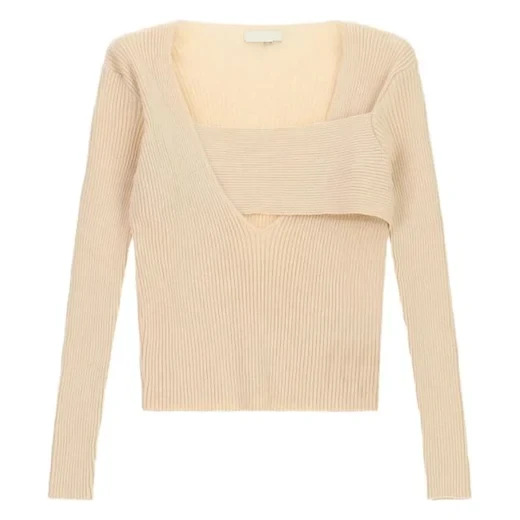
- Name
- Asymmetric ribbed crewneck sweater
- Category
- Apparel › Knitwear › Sweaters
- Color
- Cream · White familyAI
- Sizes
- S · M · L, one listing for three variants
- Material
- Wool blendAI
- Pattern
- Ribbed, asymmetric neckAI
- Occasion
- Office · Weekend · AperitivoAI
- Style
- Minimal · Casual chicAI
- 01Clean, readable namesCodes and abbreviations become full names, consistent across the whole catalog.
- 02Colors from photosWe recognize the item’s real color on a palette of 64 shades in 12 families.
- 03Consistent categoriesYour category path is mapped to Bantoa’s fashion taxonomy.
- 04Grouped variantsOne item, one listing: sizes and colors stay linked to the same product page.
- 05Checked imagesWe check resolution and background and cut out items for outfits.
- 06Availability respectedA sold-out item leaves the editor and shows as unavailable in outfits already created.
- Your original feed is never modified: the enrichment stays on Bantoa. Want the enriched feed on your own site too? Discover Feed Optimizer
One catalog, four ways to get it discovered.
The enriched feed powers every point of the Social App where your items appear, all the way to the product page of your e-commerce site.
Outfit editor
Creators search your items by category, color, style or occasion and pair them on the outfit board.
One product, many outfitsEditorial campaigns
With a custom_label in the feed you choose which items enter a campaign: the challenge offers only those.
Editorial projectsBrand Profile
The brand’s official profile shows the up-to-date catalog and all the outfits created with your items.
The Brand ProfileYour e-commerce
Every item leads to its product page, with the feed link and UTM parameters: the purchase happens on your site.
From the outfit to your siteEvery click, measured and attributed.
Traffic coming from the Social App is recognizable in your analytics and in the monthly report. You only pay for valid clicks to your product pages.
https://shop.tuobrand.it/p/maglione-40312
  ?utm_source=bantoa          // sempre uguale
  &utm_medium=social_app      // the channel
  &utm_campaign=tartan-fw26   // the campaign
  &utm_content=outfit_88412   // l’outfit
1.284 valid clicks3,8% Item CTRCPC billed at the end of the month
- Valid clicks onlyBots, repeated clicks from the same person within 30 minutes and clicks to sold-out items are not counted.
- In your analyticsCompatible with GA4, Adobe Analytics and Piwik PRO: just read the UTM parameters, no extra tags.
- Conversions, if you wantA tag on the confirmation page or a server-to-server call tells us which clicks become orders, with no personal data.
- Bantoa Brand InsightsMost-used items, styles, occasions and clicks per product, with monthly CSV export.
Activate it with the network you already use: it tracks every click and every sale.
We join your affiliate program as a publisher: item links go through the network's tracking, which records clicks and transactions.
A connection you don't have to monitor.
We only need product data. The connection is secured, monitored on every import and followed by a dedicated technical contact.
Protected feeds
Basic authentication, header token or SFTP with key. If needed, we give you the IPs to whitelist.
No data from your customers
We only read product data. Conversion tracking is aggregated and anonymous.
Data in Europe
Servers in the European Union and GDPR-compliant processing. NDA available on request.
Monitoring on every import
If the feed doesn’t respond or loses more than 20% of products, we alert you by email within an hour.
Last valid version
If an import fails, the last correct version of the catalog stays live in the Social App.
A technical contact
A dedicated contact for activation, feed changes and every new campaign.
Live in about five business days.
No setup fee and no development on your site: we only ask for the feed address. The Bantoa team takes care of the rest.
- Day 1
You send us the feed
The feed address or a sample file, with the brand’s logo and guidelines.
- Days 2–3
Verification and mapping
We check the fields, map categories and sizes and send you the report with any corrections.
- Day 4
Enrichment and Brand Profile
AI attributes across the whole catalog and the brand’s official profile, ready for your approval.
- Day 5
In the Community
Items are in the outfit editor. From here on, updates are automatic.
Frequently asked questions.
Answers to the questions e-commerce and IT teams ask us most often. For everything else, write to us.
Can I use the same feed as Google Shopping?
Yes. The Google Merchant Center feed already contains all the required fields. If you add item_group_id, color, size and additional photos, outfits turn out better, but it’s not essential.
How often is the catalog updated?
By default once a day, at the time you choose, up to 4 times a day. Prices and availability can be updated every 6 hours with a reduced feed or via API.
What happens to sold-out products?
When availability becomes out_of_stock, the item is no longer offered in the editor. In outfits already created it shows as unavailable and generates no paid clicks.
Can I activate it with my affiliate network?
Yes. We join your program as a publisher: item links go through the network’s tracking, which records clicks, sales and commissions. Your program’s terms apply and you see the reports in the network’s dashboard.
Do I need to install anything on my site?
No. The connection works with the feed. The conversion tag is optional and only needed if you want to measure orders.
Can I exclude some products?
Yes: with a custom_label in the feed or with rules on category, brand, price or availability, which we set up during activation.
Do you handle multiple languages and markets?
Yes, with one feed per language or market, each with its own prices and product page links.
Do photos need a white background?
No, but for outfits, still-life photos on a light background work best: at least 600 × 600 px, ideally 1,200 px on the long side. We handle the cutouts.
What if I change e-commerce platform?
Send us the new feed address: we redo the mapping and keep the outfits already created, linking items by ID or EAN code.
Send us the link to your feed.
We analyze it for free and within 48 hours we tell you what's already ready and what's worth improving.
